JOB / DESIGN PIPELINE

See every job, at every stage, at a glance.

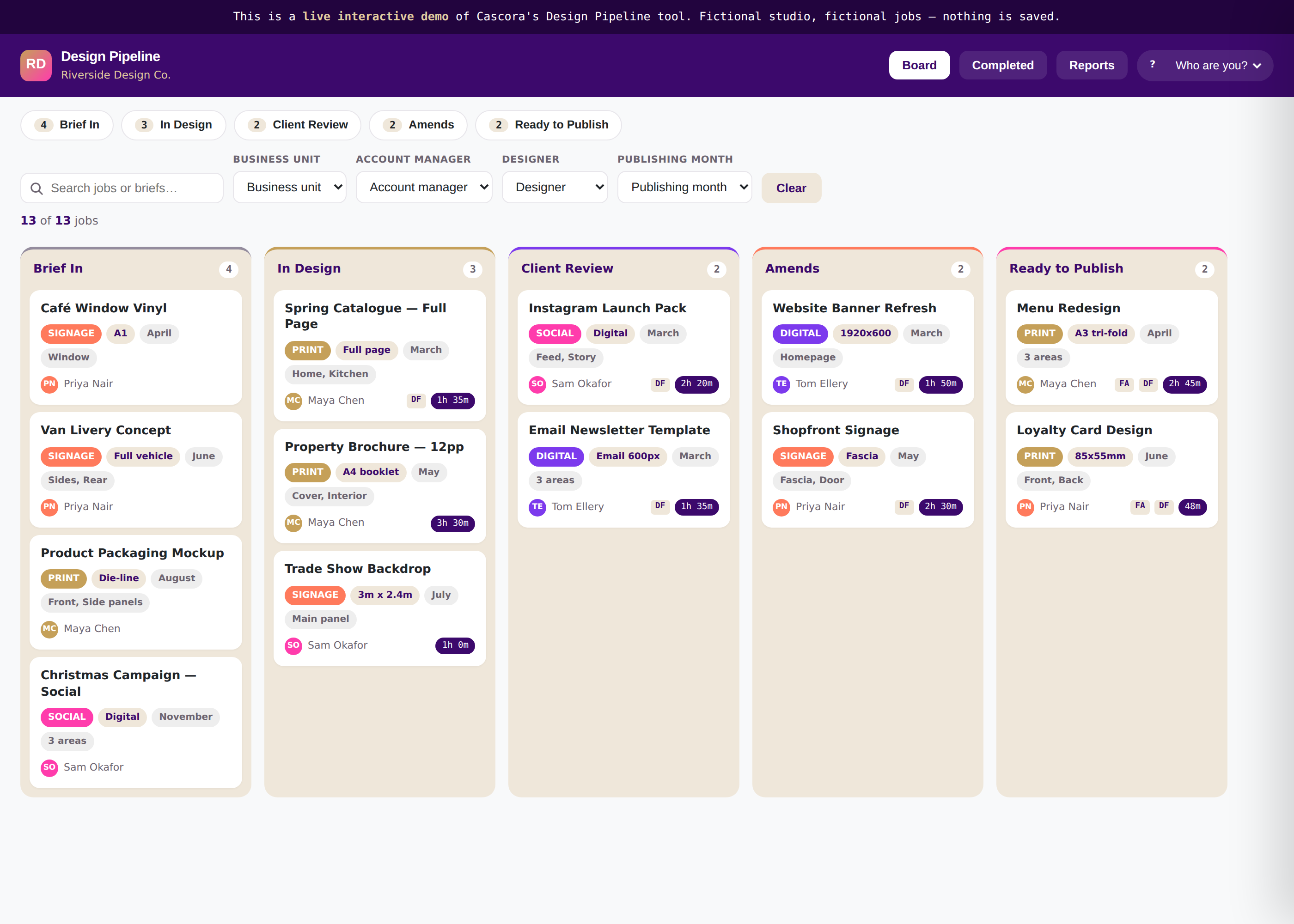
A transferable kanban that moves work from brief to delivery. Filter by unit, account manager, designer or month — click a job to see the full brief, files and live time tracking.

live preview
Design Pipeline preview
THE PROBLEM IT SOLVES

Work shouldn't disappear the moment it leaves a meeting.

"I've got no idea what's actually in progress right now."

When jobs live in spreadsheets and inboxes, visibility depends on asking around — and asking around is slow.

"Nobody logs their time, so we can't tell what's profitable."

Without a simple way to track time against a job, predicted-versus-actual is a guess, not a number.

"New starters take weeks to learn how we track work."

An ad-hoc system that only a few people fully understand is a risk every time someone's away — or leaves.

FEATURES & BENEFITS

Every stage visible, without a status meeting.

Configurable kanban stages

→Brief In, In Design, Client Review — your stages, your names — so the board matches how you actually work, not a generic default.

Filters that actually narrow things down

→By unit, account manager, designer or month — so anyone can find exactly what they're looking for in seconds.

Built-in time tracking

→Start, stop, or log time manually against any job — so predicted-versus-actual becomes a real number, not a guess.

A full brief, one click away

→Every job's brief, details, and files live in a drawer off the card — so nothing depends on tribal memory.

OUTCOMES

What actually changes once it is live.

Know what is in progress, at a glance

Predicted vs actual time, finally real numbers

New starters find their way in days

Nothing falls through the cracks

Try it yourself

Move a real job through the board.

Filter, search, open a job, change its stage, start a live timer — the same interactions your team would use every day. Fictional studio, dummy jobs, nothing saved.

Try the live demo →
Design Pipeline live demo
WHAT IT CONNECTS TO

Fits into what you already run — doesn't replace it.

Quote-to-Contract

An accepted quote can create its job on the board automatically.

File storage

Briefs and final artwork link straight to Dropbox or Google Drive.

Slack or Teams

Stage changes and deadlines notify the right channel automatically.

Reporting & payroll

Logged time can feed straight into billing or payroll exports.

Exact connections are configured per client during the mapping stage — this shows the kind of systems we typically connect to, not a fixed list.

DESIGN & BUILD TIMELINE

A board that matches your process, not a template.

01
Typically 3–5 days

Map it

Your real stages, your filters, and who needs to see what — mapped in one conversation.

02
Typically 2–3 weeks

Build it

Configured to your stages and connected to file storage and notifications.

03
Ongoing

Run it

Live, supported, and adjusted as your process evolves.

Timeframes are indicative and will be confirmed at the mapping stage — actual build time depends on catalogue size and how many systems it connects to.

Once work is tracked, clients want to see it too.Pair the pipeline with a Client Portal so customers get their own view of progress, without another status email.
Client Portal — coming soon Stock / Re-order Tracker — coming soon

Ready to see your plan?

The mapping conversation is free. You'll walk away with a clear picture of what this would look like for your business.